ProConvey Logo

Ready to transform your conveyancing process?

Conveyancing task management, built in

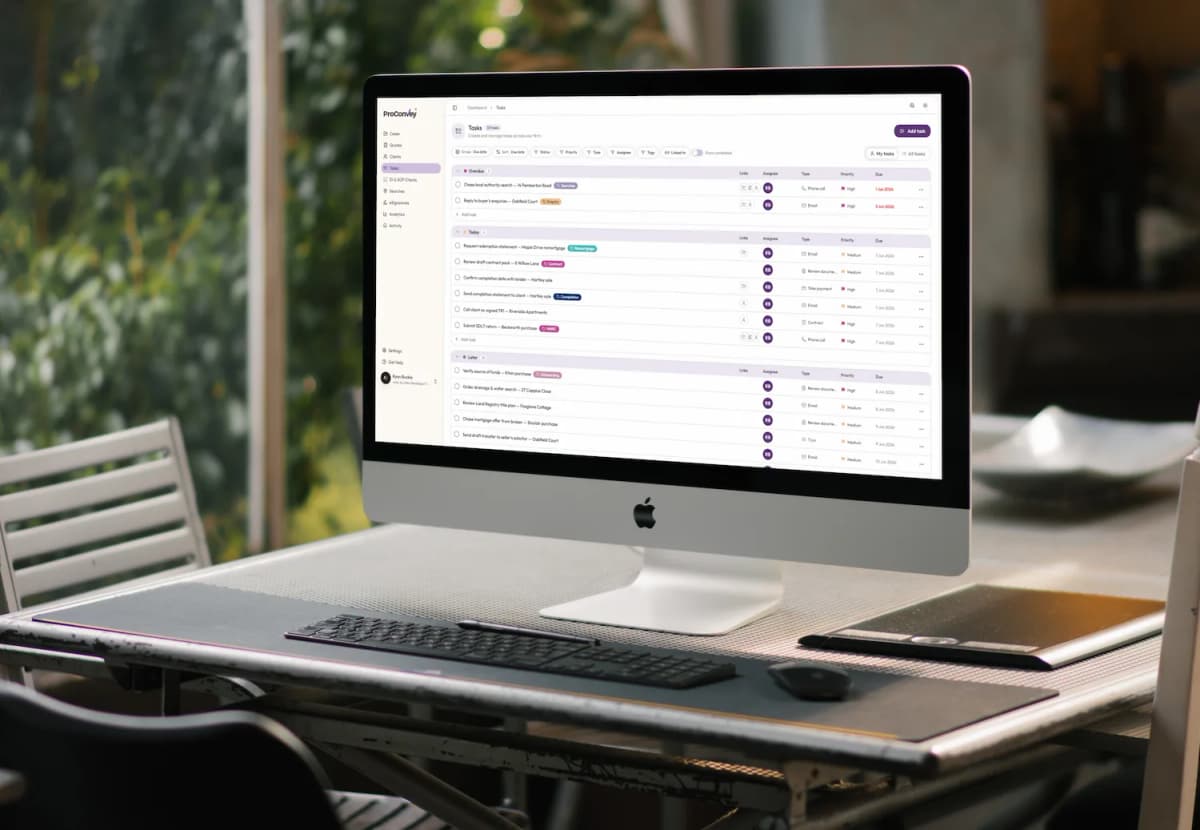
Tasks brings team to-do management into your conveyancing portal. Create, assign, schedule, and track work standalone or linked to the cases, quotes, and clients it relates to, with custom workflows, reminders, recurring tasks, and notifications.

Conveyancer managing tasks in ProConvey conveyancing software
Task reminders thought bubble
Assigned task thought bubble
Linked task thought bubble
ProConvey task management screen on an office computer

What is Tasks?

A built-in task and to-do manager inside ProConvey that lets conveyancing teams create, assign, schedule, and track work - either standalone or linked directly to the cases, quotes, and clients it relates to. No more spreadsheets, sticky notes, or separate apps.

Bullet point icon
Bring team to-do management into your conveyancing portal
Bullet point icon
Link tasks to the exact case, quote, or client they belong to
Bullet point icon
Shape your own workflow with custom statuses, priorities, types and tags
Bullet point icon
Reminders, recurring tasks and a daily digest keep nothing slipping
Conveyancer using ProConvey to create tasks for a case

Create tasks in seconds, your way

Capture work the moment it lands. Add a task inline in seconds, or open the full composer for complete setup - and never end up with an empty, incomplete task.

Bullet point icon
Standalone or linked - link a task to one or more cases, quotes and clients at once
Bullet point icon
Quick add - an inline row to create a task without opening a dialog
Bullet point icon
Full composer - a tabbed Details, Reminders and Attachments dialog
Bullet point icon
Rich-text notes - full formatted descriptions on every task
Bullet point icon
Required-field validation - title, type, assignee and due date are always captured
Conveyancer using a tablet to manage case tasks in ProConvey

Assign, prioritise and schedule

Give every task an owner, a deadline, and a place in your process. Multiple assignees, clear dates, and colour-coded priorities make it obvious who is doing what and what matters most.

Bullet point icon
Assign multiple team members to a single task
Bullet point icon
Set both start dates and due dates
Bullet point icon
Colour-coded, configurable priorities such as High, Medium and Low
Bullet point icon
Task types like Call, Email, Document review, Follow-up and Meeting - each with its own icon
Bullet point icon
Configurable statuses with closed and complete states that drive completion counts
Configuring a conveyancing workflow for your firm in ProConvey

Your workflow, your way

Every firm works differently. Admins define their own status, priority, and type libraries in settings - labels, colours, icons, sort order, and defaults - while privacy controls keep sensitive work where it should be.

Bullet point icon
Firm-defined status, priority and type libraries with sensible defaults out of the box
Bullet point icon
Colour-coded, organisation-wide tags you can create on the fly
Bullet point icon
Public tasks visible to the relevant branch, colleagues on linked cases, the creator and assignees
Bullet point icon
Private tasks restricted to the creator and assignees, with oversight for admins
Bullet point icon
Access respects your existing branch and case permissions
Everything Tasks can do

One place for every to-do

From linking work to cases to recurring reminders, Tasks gives your team everything it needs to stay on top of the conveyancing process.

Linked to cases, quotes & clients

Linked to cases, quotes & clients

A task can stand alone or link to one or more cases, quotes, and clients at the same time, so work always lives next to the record it relates to.

Custom statuses, priorities & types

Custom statuses, priorities & types

Define your own status, priority, and type libraries with labels, colours, icons, and defaults. Sensible defaults ship out of the box.

Assignees & due dates

Assignees & due dates

Assign multiple team members to a task, set start and due dates, and colour-code priorities so everyone knows what matters most.

Reminders

Reminders

Schedule one or more reminders per task and choose exactly who gets notified, delivered in-app and by email at the scheduled time.

Recurring tasks

Recurring tasks

Repeat tasks daily, weekly, monthly, or yearly - either on a fixed schedule or based on when you complete them.

Daily digest email

Daily digest email

An opt-in daily email summarising every task that is overdue or due today, controlled by each team member from their notification settings.

Tags

Tags

Colour-coded, organisation-wide labels you can create on the fly while tagging a task to group and find work your way.

Attachments & documents

Attachments & documents

Attach files and documents directly to a task with upload progress, keeping everything you need in one place.

Views, filters & search

Views, filters & search

Switch between My tasks and All tasks, group and sort, filter by status, priority, type, assignee, tags, or linked record, and search across everything.

Private vs public tasks

Private vs public tasks

Choose public or private visibility per task. Access respects existing branch and case permissions so people only see what they should.

Inline editing

Inline editing

Change status, assignee, due date, type, tags, and links directly from the list row via popovers, without opening the task.

Embedded on every record

Embedded on every record

View and add tasks from the dedicated Tasks page, or right inside case, quote, and client pages, in context and without leaving.

Conveyancing office working on ProConvey and hitting their deadlines

Stay on top of every deadline

Reminders, recurring tasks, and a daily digest make sure nothing slips through the cracks - delivered through the notification system your team already uses, in-app and by email.

Bullet point icon
Schedule one or multiple reminders per task and choose exactly who is notified
Bullet point icon
Repeat tasks daily, weekly, monthly or yearly
Bullet point icon
Repeat on schedule so the cadence never drifts, or repeat after completion
Bullet point icon
Assignment and reminder notifications keep everyone in the loop
Bullet point icon
Opt-in daily digest email of everything overdue and due today
Conveyancing team discussing their cases and tasks using ProConvey

Find work fast, right where you work

Slice your task list however suits you, then act on it without losing context. Tasks live on a dedicated page and embedded on the case, quote, and client records they relate to.

Bullet point icon
Two views - My tasks and All tasks
Bullet point icon
Group by status, priority, type, assignee or due date, and sort multiple ways
Bullet point icon
Filter by status, priority, type, assignee, tags and the linked case, quote or client
Bullet point icon
Full-text search, show or hide completed, and grouped lists with live counts
Bullet point icon
Edit status, assignee, due date, type, tags and links inline - and attach files to any task
Built for conveyancing

Tasks for the way conveyancers work

Real conveyancing to-dos, handled in context - from chasing AML documents to recurring weekly file reviews.

Chase outstanding ID/AML documents

Chase outstanding ID/AML documents

Linked to a case, due tomorrow, assigned to a paralegal, and repeating every 3 days until completion - so nothing is forgotten.

Review draft contract

Review draft contract

Typed as Document review, set to high priority, and linked to both the case and the client it concerns.

Call client re: searches

Call client re: searches

With a reminder one hour before, notifying the fee earner in-app and by email so the call always happens on time.

Weekly file review

Weekly file review

A recurring task across a caseload that recreates itself automatically, carrying over reminders and the start-to-due gap.

Why teams love it

Less admin, more done

Tasks keeps your whole team on top of every deadline while cutting the busywork.

Bullet point icon
Nothing slips through the cracks - reminders, recurring tasks and a daily digest keep the team on top of every deadline.
Bullet point icon
Less admin, more context - tasks live next to the case, quote or client they relate to, not in a separate tool.
Bullet point icon
Your workflow, your way - custom statuses, priorities, types and tags fit each firm's process.
Bullet point icon
Team-wide clarity - assign work, filter by person and see who is doing what across branches.

Related features

Discover other features that work great with this one

Case Overviews

Case Overviews

A snapshot of all case information and PDFs to download.

Learn about Case Overviews
Know Your Case and Client

Know Your Case and Client

Simplify your KYC in one hit. Gather all Case and Client information easily.

Learn about Know Your Case and Client
Onboarding Letters

Onboarding Letters

Automated letters with eSign for sales, purchase and remortgage.

Learn about Onboarding Letters
Conveyancing Searches

Conveyancing Searches

Tailored search packs with 1-click ordering and individual search products.

Learn about Conveyancing Searches
Mobile Ready

Mobile Ready

Fully responsive client experience available on desktop, tablet and mobile.

Learn about Mobile Ready
Conveyancers

Conveyancers

Streamline your conveyancing process with digital tools and automation.

Learn about Conveyancers
Estate Agents

Estate Agents

Enhance client experience with integrated conveyancing solutions.

Learn about Estate Agents

Frequently asked questions

Everything you need to know about task and to-do management in ProConvey.

RS
CS
MS

Still have questions?

Our team is happy to walk you through how Tasks fits into your conveyancing workflow.

Ready to get started?

Bring your team's to-do list into ProConvey

Join for free and test drive Tasks alongside every other feature in minutes. No commitment necessary.

Conveyancing office using ProConvey to manage tasks